Google Forms add-on

Limit Google Forms choices before they overbook.

Form Choice Limiter removes a choice from your live form when its response limit is reached. Use it for appointment slots, class signups, event sessions, volunteer lists, and any form where each option has its own capacity.

Response manager Edit, reschedule, and clean submissions.
Scheduled restores Remove old responses and restart forms.
Easy reopening Increase a limit to restore one option.
Privacy-first No responder or student data stored.

Feature focus

Designed for appointments, classes, and registrations

The sidebar is intentionally direct: limits, response counts, settings, sharing, and restore actions stay close to the form owner’s workflow.

  • Limit multiple choice, checkbox, and dropdown options.
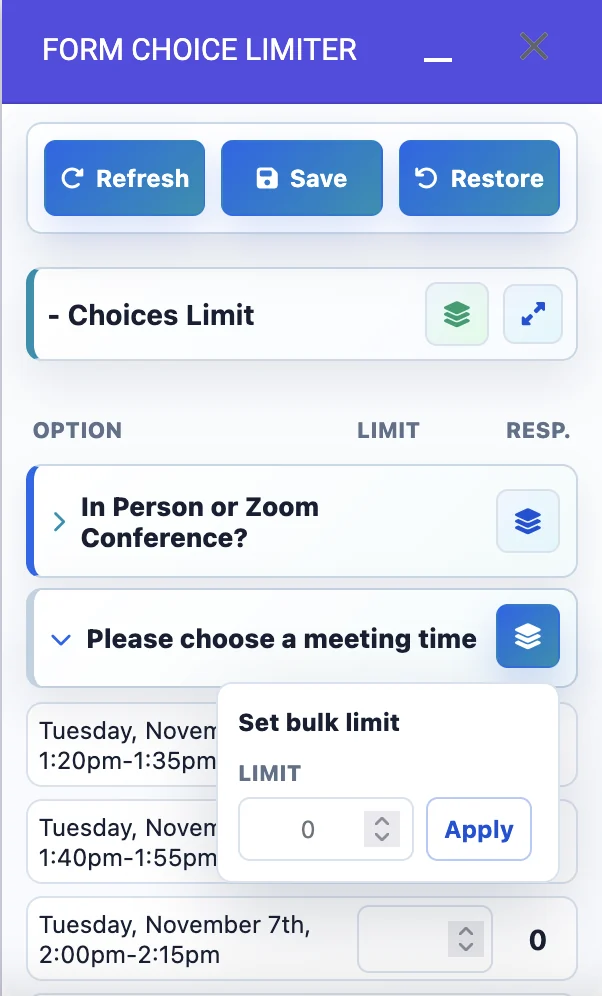
  • Apply one bulk limit to every choice in a question.
  • Use 0 or an empty field for unlimited choices.
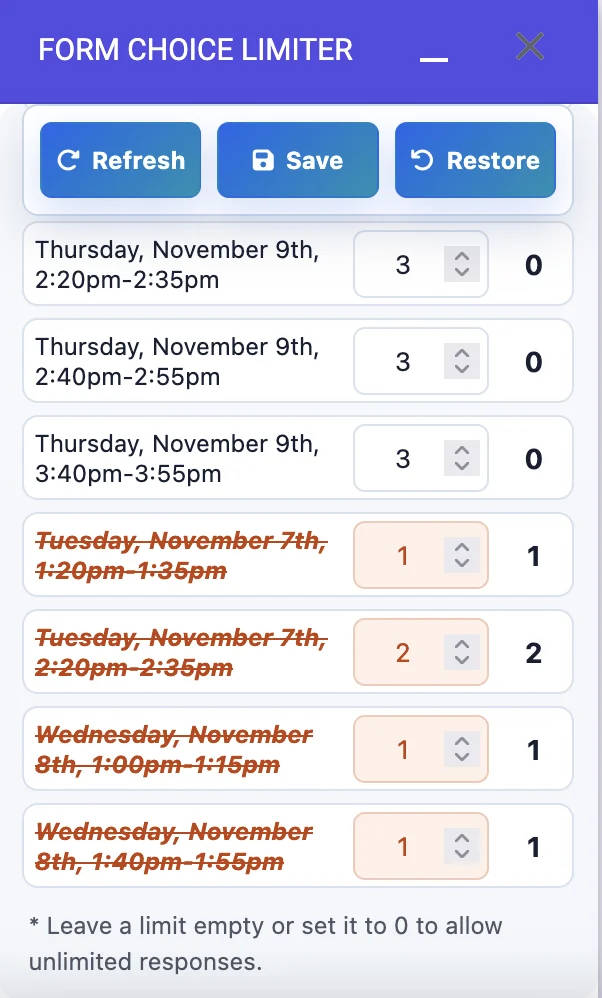
  • Track removed options when limits are reached.
  • Edit submitted response history and correct choice selections; limits are recalculated automatically, so choices reopen when space is available and close again when they are full.
  • Notify admins when a choice reaches its limit.
  • Customize final choice text for unavailable options.
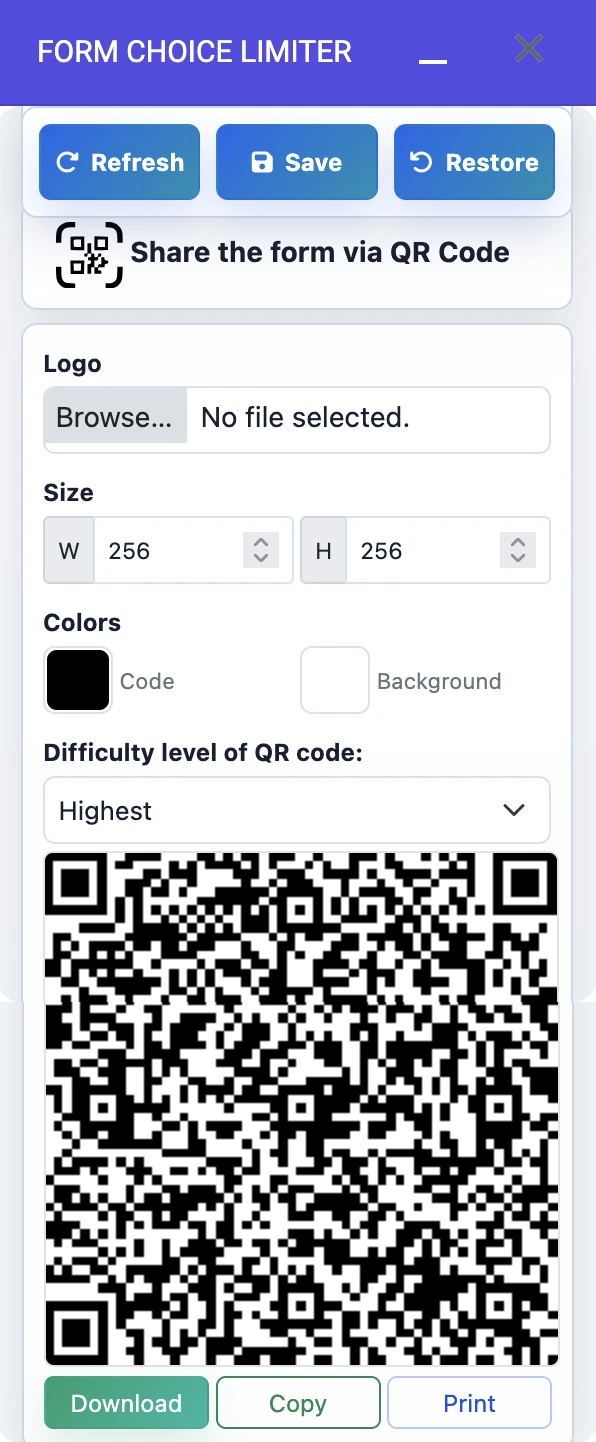
  • Share the form through QR code tools.
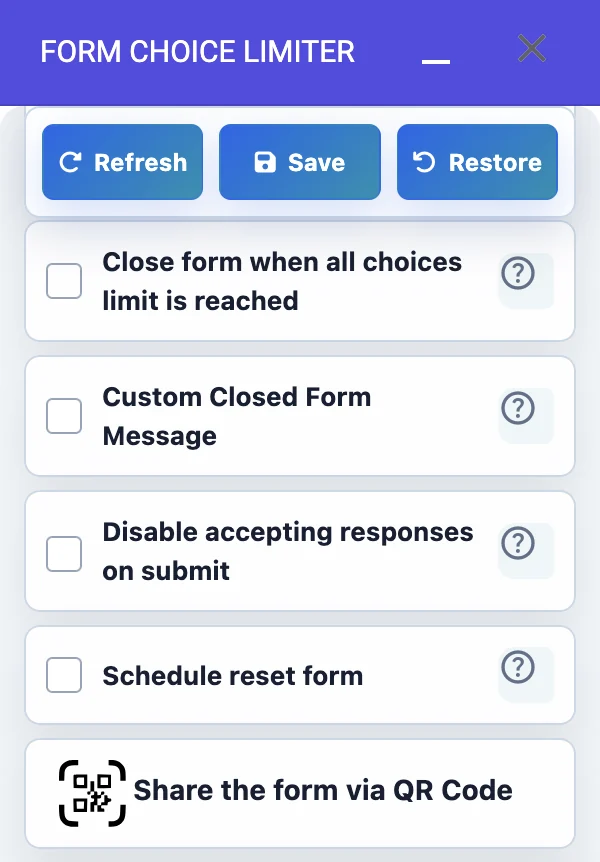
  • Close the form when every limited choice is filled.
  • Write a custom closed form message.
  • Disable accepting responses after submit when needed.
  • Schedule reset cycles for recurring forms.
  • Restore individual options by increasing the limit.
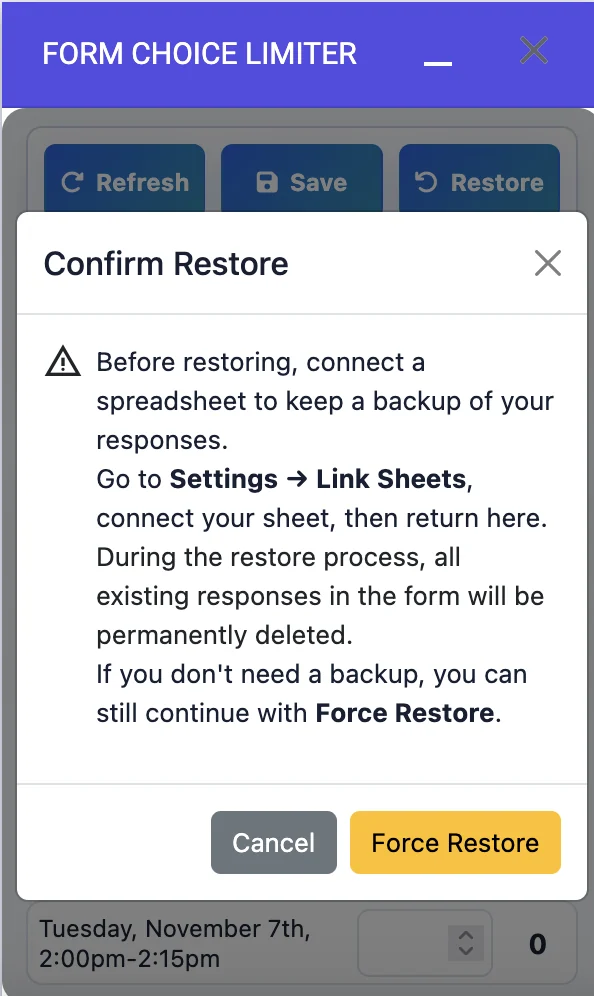
  • Use restore safeguards before deleting existing responses.
Form Choice Limiter settings menu with QR sharing and reset controls Form Choice Limiter choice limit panel with bulk limit controls

Main advantages

More than a basic choice limiter

Form Choice Limiter is built for real scheduling work: parent-teacher meetings, event registration, class signups, volunteer slots, and recurring surveys that need cleanup after each cycle.

Edit submitted responses with Response Manager

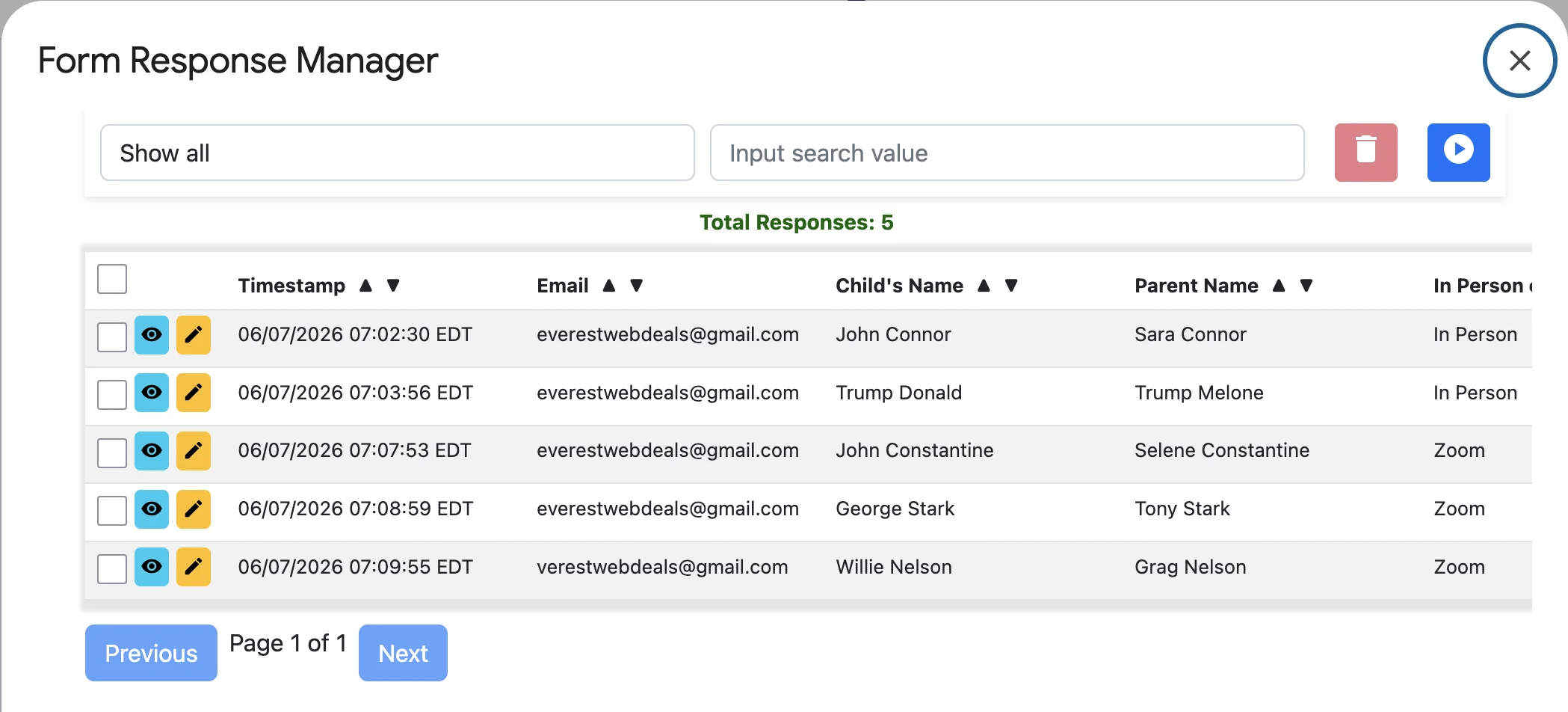
Reschedule events for individual responders, remove duplicate responses, delete canceled event responses, and correct submitted details after a response is already in the form.

This makes event registration and parent-teacher scheduling easier because admins can fix real-world changes without rebuilding the form.

Schedule restore and start the survey again

Scheduled restore can remove old responses, reopen reached-limit options, and restart the form for a new booking or survey cycle.

Clearing old responses helps support precise limit control, limit-to-one-response workflows, and simpler recurring option limits.

Restore individual options by increasing the limit

When one option reaches its limit, you do not need a full reset. Increase that option’s limit and it can become available again.

High-security data handling

We do not sell or share user data. The add-on stores only the owner email and the partial form structure required to limit the form.

No responder or student data is stored on our end. Required add-on data is stored in a USA RDS database and encrypted securely.

COPPA compliant FERPA compliant

Education and business scheduling

Built for recurring events, classes, and appointment workflows

Use the same Google Form for parent-teacher conferences, training sessions, office hours, volunteer schedules, and recurring surveys while Form Choice Limiter handles filled options and restore cycles.

How it works

A simple flow for form owners

Open the add-on, choose the form question you want to control, set limits for each option, and save. Form Choice Limiter keeps watching responses so full choices are removed and available choices stay open.

Choose a question

Open the add-on sidebar and expand the Google Forms question that needs limits.

Set limits

Enter individual limits or use the bulk limit popup when every choice has the same capacity.

Save once

The add-on tracks response counts and removes filled choices from the live form.

Restore later

Restore options manually or schedule resets when a new booking cycle begins.

Product tour

Set limits, monitor filled choices, and restore safely

See how Form Choice Limiter helps admins apply limits quickly, identify closed options, notify the right people, and avoid accidental response deletion during restores.

Removed options crossed out after limits are reached

See removed options clearly

Set a limit for each choice. When responses reach that limit, Form Choice Limiter removes the option from the live form and moves it below active options in the add-on configuration. Removed options appear in red with strikethrough styling, but their limits are still editable: increase the limit above the current response count and save to restore the option.

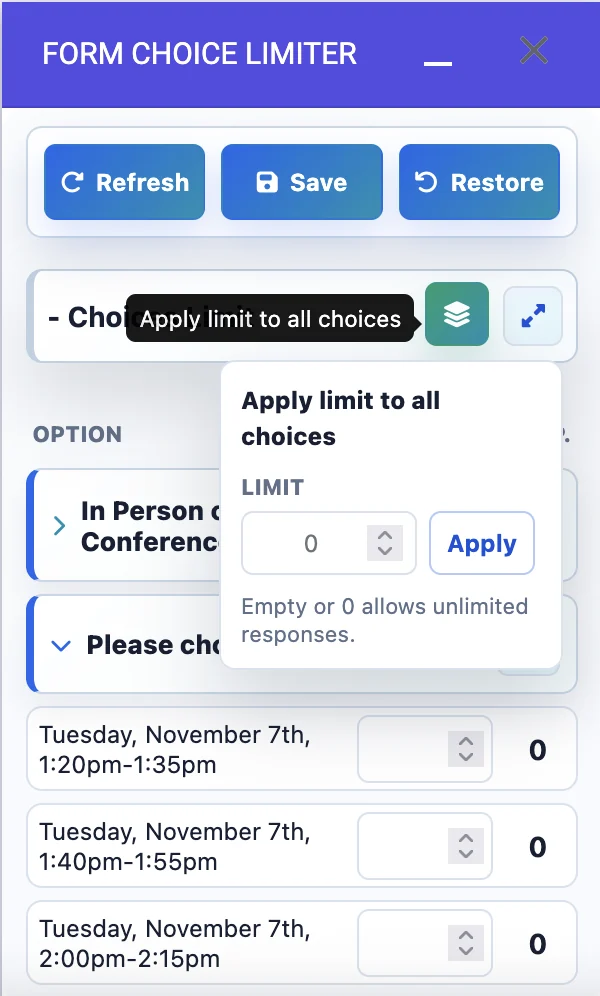
Apply limit to all choices popup and tooltip

Apply one limit to every choice

Use bulk limit when every appointment time, class seat, or event slot has the same capacity. Enter the limit once and apply it to all choices in that question.

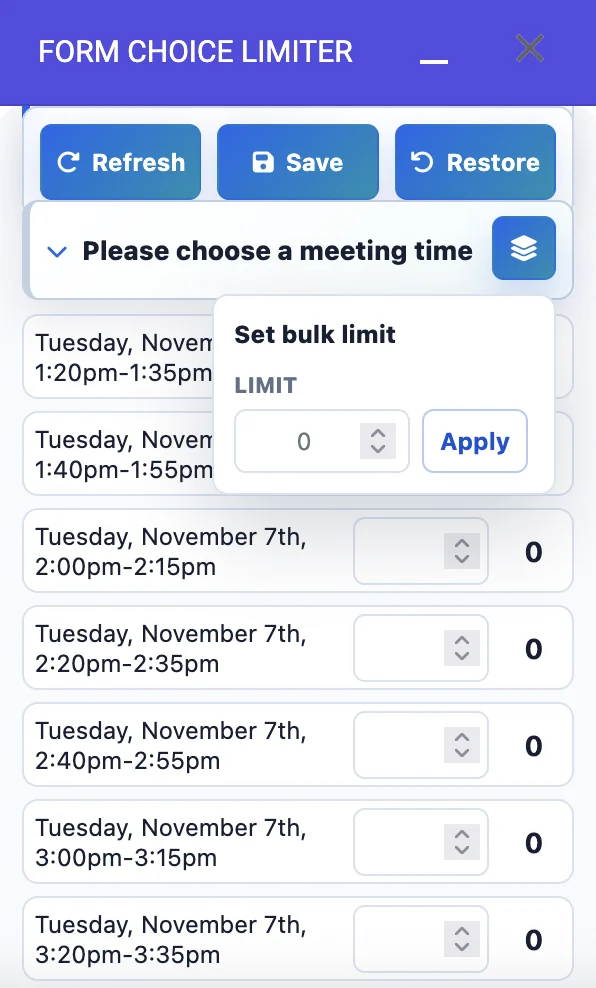
Set bulk limit popup inside the meeting time question

Set limits inside the question

The popup stays near the selected question, so the user sees exactly which options will be updated.

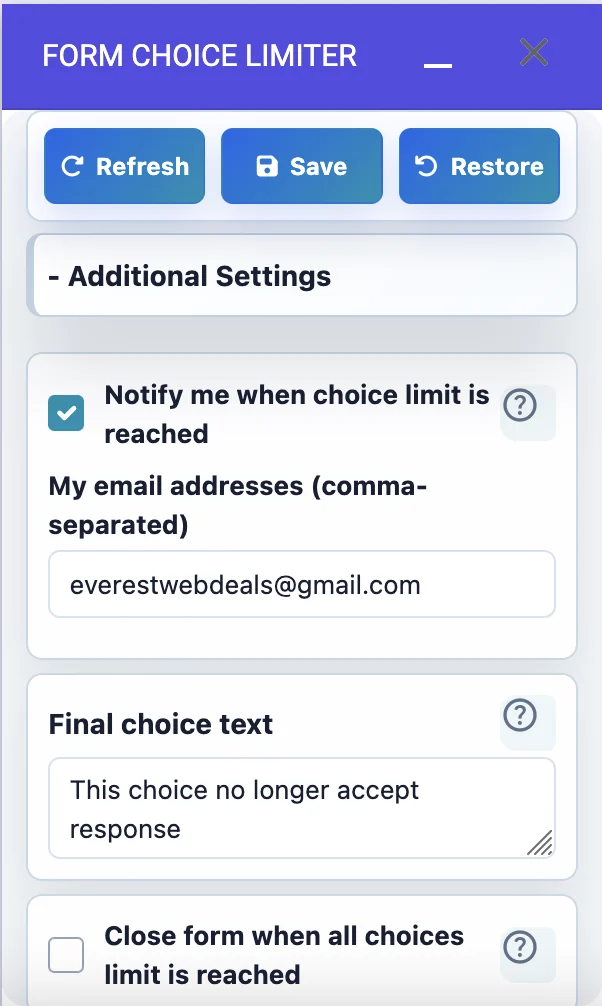
Notification and final choice text settings

Set alerts and final text

Email alerts and final choice messaging are easier to trust when shown in the actual interface.

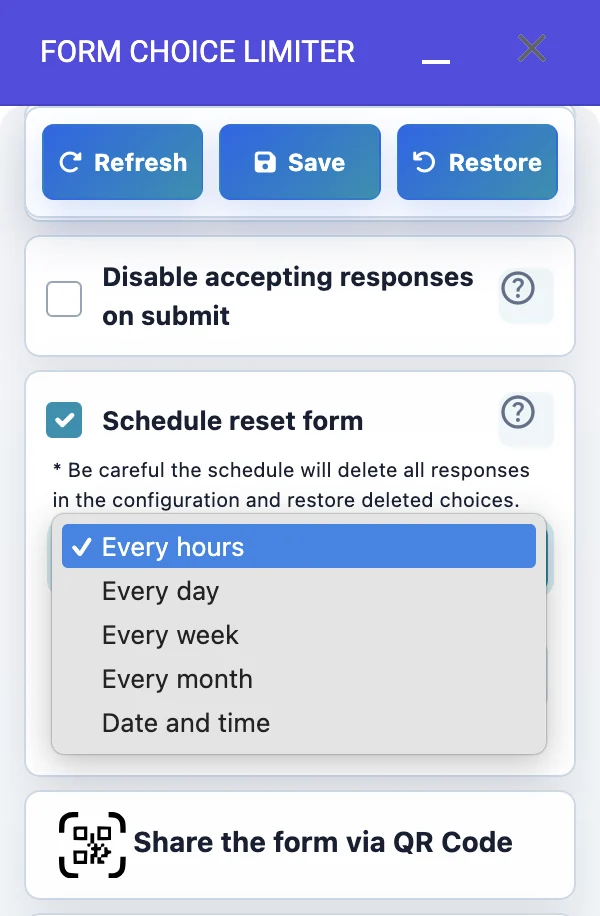
Schedule reset form responses setting with repeat options

Schedule reset and restart surveys

Schedule reset can delete old responses, restore choices that were removed after reaching their limits, and restart the same form for the next survey or booking cycle.

Restore warning dialog explaining spreadsheet backup

Restore with a safety warning

The restore screenshot communicates a careful workflow before deleting existing responses.

QR code customization screen with settings, generated code, and download, copy, and print actions

Customize and share QR codes

Generate a QR code for the form, customize its logo, size, colors, and difficulty level, then download, copy, or print it for quick access.

Response manager

Manage submissions after the form is live

Response Manager is one of the biggest advantages over simpler limiter add-ons because it helps admins fix and clean submitted data after real users change plans.

Form Response Manager table with search, edit, delete, and pagination controls

Reschedule

Edit submitted responses when an attendee needs a different time or event option.

Correct

Fix responder details after submission without asking users to submit again.

Clean

Remove duplicate responses and canceled event registrations from the manager.

Tutorial videos

Learn the add-on step by step

Watch the specific workflows behind Form Choice Limiter: install the add-on, set choice limits, create appointment slots, manage submitted responses, and let users update existing submissions.

Install Form Choice Limiter

Walk through installing the add-on from Google Workspace Marketplace and opening it inside a Google Form.

Form Choice Limiter overview

Get a practical overview of the add-on, including limits for multiple choice, checkbox, dropdown, and appointment scheduling options.

Limit choice responses

Set response limits for choice options, keep selected options unlimited when needed, and remove choices automatically when their limit is reached.

Create scheduled appointments

Build appointment slots in Google Forms and apply limits so meeting times, classes, or parent-teacher sessions stop accepting sign-ups when full.

Manage Google Forms responses

Learn how Response Manager helps you find, sort, view, delete, and review submitted responses directly from Google Forms.

Edit submitted responses

See how to search submitted records, edit a Google Form response, and remove outdated or incorrect entries without creating a new submission.

Let users edit and update responses

Show responders how to update an existing submission so event changes stay clean instead of creating duplicate responses.

FAQ

Common questions

What question types can it limit?

Form Choice Limiter supports multiple choice, checkbox, and dropdown questions in Google Forms.

What happens when a choice reaches its limit?

The add-on removes that choice from the live form so future respondents cannot select it.

Can choices be restored?

Yes. You can restore an individual reached-limit option by increasing its limit, or schedule restores to remove old responses and reopen options for a new cycle.

What data is stored by the add-on?

The add-on stores the owner email and partial form structure required for limiting. It does not store responder or student data on our end.

Is the add-on suitable for schools?

Yes. Form Choice Limiter is designed for COPPA and FERPA compliant workflows by keeping responder and student data out of our storage, limiting stored add-on data to the owner email and required partial form structure.

Can I edit submitted responses?

Yes. Response Manager lets admins review submitted responses, reschedule individual responders, correct submitted details, and remove duplicate or canceled event responses.

Ready to install

Keep your Google Form open while full choices close themselves.

Set capacities once, save the add-on settings, and let Form Choice Limiter handle filled options.

Install Form Choice Limiter
Hi, I am your personal AI assistant